
For Apple Silicon (M1+) · macOS 14+
AI iMessage Assistant for Mac
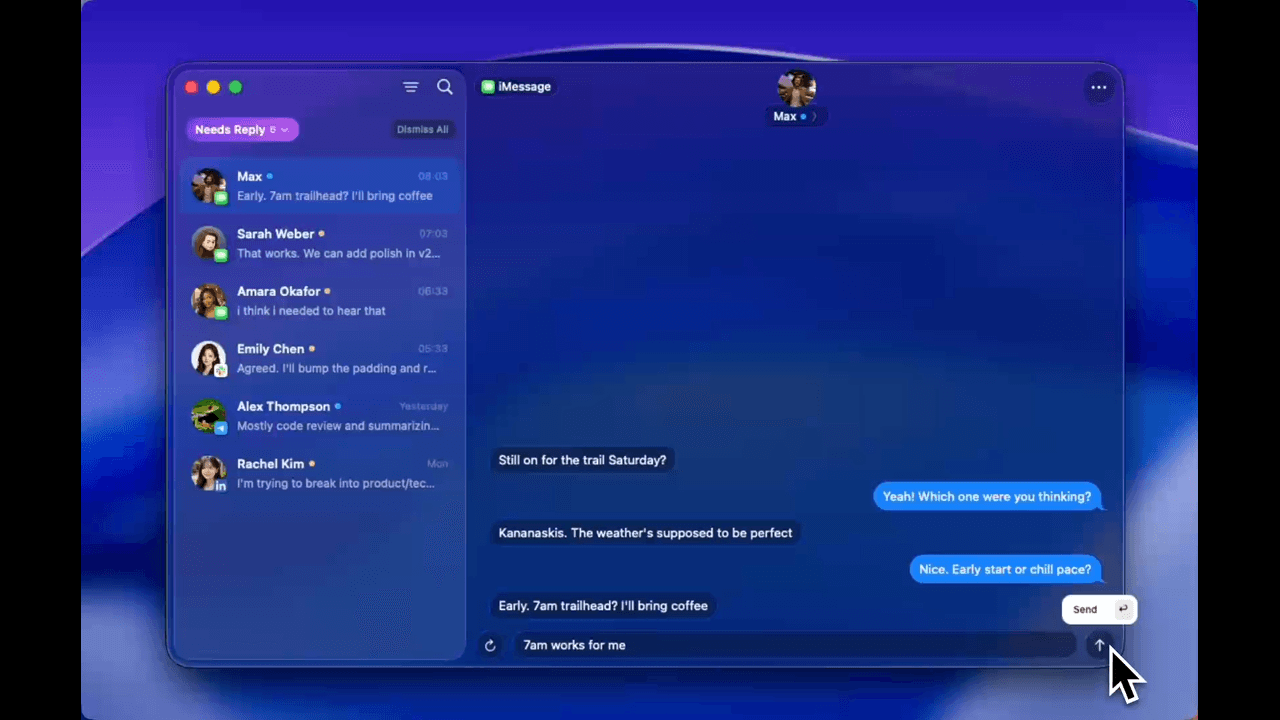
NOX uses the Messages already on your Mac to draft replies in your voice, search by meaning, and surface what needs an answer. You review every draft before you send it.
Download for Mac — 10 replies freeFree includes 10 AI-drafted replies, unlimited search, and unified inbox access.
Plans
Start free. Upgrade when you need unlimited drafts.
The free plan is enough to test the complete iMessage workflow on your own conversations before choosing Pro.
Free
10 AI-drafted replies
Unlimited search and unified inbox access.
Pro
$50/month
Unlimited AI-drafted replies.
How It Works
NOX connects to the Messages database already on your Mac—no browser extension or phone-side setup. It indexes conversations locally so you can search by meaning and see which threads need a reply.
For drafting, NOX uses conversation context and patterns from your past messages to suggest a response. Cloud AI is the default; on-device AI is optional. Edit, approve, or ignore every suggestion.
iMessage, SMS that appears in Messages through iPhone forwarding, group chats, photos, links, and tapbacks stay in the Mac workflow you already use.
Key Features
Drafts grounded in the thread
NOX reads the conversation around a message before suggesting a reply, so the draft starts with the right context.
Tone that adapts by contact
Suggestions draw from your word choice, punctuation, and tone in past conversations. You can change every word before sending.
Search by meaning
Look for the idea you remember instead of the exact phrase. NOX searches the local conversation index for the relevant thread.
See what needs a reply
NOX surfaces conversations that appear to need a response so you can decide where to focus first.
You decide what sends
Every suggestion can be edited, approved, or ignored. NOX never sends an iMessage without your explicit action.
iMessage and forwarded SMS
If a conversation appears in the Messages app on your Mac, NOX can include it in the same search, triage, and drafting workflow.
Setup Guide
- 1
Download NOX
Use an Apple Silicon Mac (M1 or newer) running macOS 14 Sonoma or later.
- 2
Grant Full Disk Access
NOX reads the Messages database stored locally. System Settings → Privacy & Security → Full Disk Access.
- 3
Grant Accessibility
For keyboard shortcuts and quick-reply overlays.
- 4
Index conversations
NOX builds a local search index from the Messages history stored on your Mac.
- 5
Review your first draft
Open a conversation in NOX, edit or approve the suggestion, and choose what gets sent.
Use Cases
A busy personal inbox
Bring conversations that need a response into one view instead of scanning every thread in Messages.
Client conversations
Draft a contextual answer from the existing thread, then adjust the wording before you send it.
Fast-moving group chats
Use the surrounding conversation to understand what was asked and compose the response you want.
Finding an old detail
Search by the idea you remember to recover an address, recommendation, commitment, or shared link.
FAQ
NOX reads the Messages database stored on your Mac, builds a local search index, and uses the surrounding thread to suggest replies inside the NOX app.
No. NOX drafts; you decide. Edit, approve, or ignore every suggestion before anything is sent.
NOX requires an Apple Silicon Mac (M1 or newer) running macOS 14 Sonoma or later. Intel Macs are not currently supported.
Yes. Free includes 10 AI-drafted replies, unlimited search, and unified inbox access. Pro is $50 per month and removes the reply limit.
Messages are indexed and stored locally on your Mac. Cloud models process message content transiently for drafting by default, and NOX does not persistently store that content on its servers. You can switch to on-device AI in settings.
Yes. If an SMS conversation appears in the Messages app on your Mac through iPhone forwarding, NOX can include it too.
macOS only. But with iCloud Messages enabled, iPhone conversations sync to your Mac and NOX can assist from your desktop.
Let NOX draft the next iMessage. You decide what gets sent.
Download for Mac — 10 replies freeFree includes 10 AI-drafted replies, unlimited search, and unified inbox access.